<!doctype html>
<html xmlns="http://www.w3.org/1999/xhtml"  dir="ltr" lang="zh-CN" xml:lang="zh-CN">
<head>
<meta http-equiv="Content-Type" content="text/html; charset=utf-8" />
<title>百度熊掌号开发改造 - 艺琼网络</title>
<meta name="Keywords" content="熊掌号开发,熊掌号改造">
<meta name="Description" content="百度熊掌号一出，许多站长跃跃欲试。申请好熊掌号，实际上就已经可以使用了，但是，为了从熊掌号获得更多的权益，将熊掌号的优势发挥到极致，还需要对百度熊掌号进行开发和改造，具体方法如下。">
<meta name="searchtitle" content="熊掌号开发,熊掌号改造"/>
<base href="https://www.yiqnet.com/">
<meta property="og:type" content="article" />
<meta property="og:title" content="百度熊掌号开发改造 - 艺琼网络" />
<meta property="og:description" content="百度熊掌号一出，许多站长跃跃欲试。申请好熊掌号，实际上就已经可以使用了，但是，为了从熊掌号获得更多的权益，将熊掌号的优势发挥到极致，还需要对百度熊掌号进行开发和改造，具体方法如下。" />
<meta property="og:image" content="https://www.yiqnet.com/userfiles/2018-04/20180416_135755_143.jpg" /><meta name="viewport" content="width=device-width, initial-scale=1.0">
<meta name="applicable-device"content="pc,mobile">
<meta http-equiv="X-UA-Compatible" content="IE=EmulateIE11" />
<meta name="format-detection" content="telephone=no" />
<meta http-equiv="Cache-Control" content="no-transform" />
<meta http-equiv="Cache-Control" content="no-siteapp" />
<meta name="MobileOptimized" content="width"/>
<meta name="HandheldFriendly" content="true"/>
<!--<link href="js/bootstrap/css/bootstrap.min.css" rel="stylesheet">-->
<!--<link href="https://cdn.jsdelivr.net/npm/bootstrap@5.2.3/dist/css/bootstrap.min.css" rel="stylesheet">--><script language="javascript" src="js/Jquery/jquery-3.5.0.min.js"></script>
<link href="js/animate/4.1.1/animate.min.css" rel="stylesheet" type="text/css" />
<script language="javascript" src="js/all.js"></script>
<script>
var _hmt = _hmt || [];
(function() {
  var hm = document.createElement("script");
  hm.src = "https://hm.baidu.com/hm.js?102c2ecbbbdfd4224191d11049ead137";
  var s = document.getElementsByTagName("script")[0]; 
  s.parentNode.insertBefore(hm, s);
})();
</script><script language="javascript">
//document.oncontextmenu=new Function("event.returnValue=false;");
//document.onselectstart=new Function("event.returnValue=false;");
</script>
<link rel="canonical" href="https://www.yiqnet.com/news/n810.html"/>
<link href="style.css" rel="stylesheet" type="text/css" />
</head>

<body>
<!--<link href="tool/yiqfont/yiqfont.css" rel="stylesheet" type="text/css" />-->
<link href="//at.alicdn.com/t/c/font_4133111_c1a1a4uycrf.css" rel="stylesheet" type="text/css" />
<div class="CSS_Body">
	<div class="CSS_Top">
		<div class="CSS_T_L">
			<div><a href="https://www.yiqnet.com"><img src="images/logo.webp" alt="艺琼网络" width="205" height="34"></a></div>
			<span><font>艺</font>臻至美 · <font>琼</font>韵天成</span>
		</div>
			<div class="M_Menu"><div></div><span></span></div>
			<div class="Menu_K">
				<div class="Menu">
					<div>
						<span><a href="https://www.yiqnet.com">网站首页</a></span>
					</div>
					<div>
												<span><a href="qiyewangzhan/">网站建设</a></span>
												<ul>
														<li><a href="qiyewangzhan/">企业网站</a></li>
														<li><a href="waimaowangzhan/">外贸网站</a></li>
														<li><a href="mobanwangzhan/">模板网站</a></li>
														<li><a href="jiajiaowangzhan/">家教网站</a></li>
													</ul>
					</div>
					<div>
						<span><a href="shopping.html">电商平台</a></span>
						<ul>
							<li><a href="shopping.html">服务简介</a></li>
							<li><a href="yangban.html">样板欣赏</a></li>
						</ul>
					</div>
					<div>
						<span><a href="xiaochengxu.html">小程序</a></span>
						<ul>
							<li><a href="xiaochengxu.html">服务简介</a></li>
							<li><a href="yangban.html">样板欣赏</a></li>
						</ul>
					</div>
					<div>
						<span><a href="case.html">客户案例</a></span>
						<ul>
													<li><a href="case1-1.html" title="企业网站成功案例">企业网站</a></li>
													<li><a href="case1-4.html" title="外贸网站成功案例">外贸网站</a></li>
													<li><a href="case1-3.html" title="行业网站成功案例">行业网站</a></li>
													<li><a href="case1-5.html" title="模板网站成功案例">模板网站</a></li>
												</ul>
					</div>
					<div>
						<span><a href="news.html">建站资讯</a></span>
					</div>
					<div>
						<span><a href="contact.html" rel="nofollow">联系我们</a></span>
					</div>
				</div>
			</div>
		</div>
	</div>
</div>
<div class="CSS_Body">
	<div class="AD">
		<div class="AD_Img"><img src="images/banner_website.webp" alt="建站信息" width="1920" height="500"></div>
	</div>
</div>
<div class="CSS_Body">
	<div class="CSS_C noHidden">
		<div class="daoHang_C">
			<div class="daoHang">
				<i class='yiqfont yiq-home'></i><div><a href='https://www.yiqnet.com'>网站首页</a></div>								<i class="yiqfont yiq-arrow_right"></i>
								<div><a href="news.html">建站资讯</a></div>
								<i class="yiqfont yiq-arrow_right"></i>
								<div>优化运营</div>
							</div>
		</div>
	</div>
</div>
<div class="CSS_Body">
	<div class="CSS_C">
		<div class="CSS_Right CSS_Right_Full" style="overflow: visible;">
			<div class="Paper">
				<div class="CSS_R_Title">
					<h1>百度熊掌号开发改造</h1>
					<span>
					浏览：20290人次　发布日期：2018-04-16　来源：艺琼网络</span>
				</div>
								<div class="ZhaiYao">为了获得更多的权益，将熊掌号的优势发挥到极致，还需要对百度熊掌号进行开发和改造。</div>
								<div class="CSS_R_C formatText">
					<p>　　百度熊掌号一出，许多站长跃跃欲试。申请好熊掌号，实际上就已经可以使用了，但是，为了从熊掌号获得更多的权益，将熊掌号的优势发挥到极致，还需要对百度熊掌号进行开发和改造，具体方法如下。</p>
<p>&nbsp;</p>
<p style="text-align: center;"><img src="/userfiles/2018-04/20180416_135755_143.jpg" alt="百度熊掌号" width="600" height="400" /></p>
<p>&nbsp;</p>
<p><strong>网页改造</strong></p>
<p>　　百度熊掌号是针对移动互联网推出的新产品，因此，你的网站需要支持移动设备，换句话讲，你的网站需要配置手机版网站，并且网站中所要提交到熊掌号的网页需要符合熊掌号的接入标准。请参考<a href="http://zhanzhang.bj.bcebos.com/xzh_page_experience_specification.pdf?authorization=bce-auth-v1%2F92d5b24d15304e87a666affbe2db521e%2F2017-10-25T08%3A00%3A23Z%2F-1%2Fhost%2F2bcd06d6bf23880acd3783116444e1dbbea4c042dae6c65544bec62c138d1afb" target="_blank"><u>《熊掌号落地页体验规范》</u></a></p>
<p>&nbsp;</p>
<p><strong>粉丝改造</strong></p>
<p>　　百度熊掌号类似于微信公众号，可以被关注成为你的粉丝。熊掌号提供了一个粉丝关注接口，操作步骤是：</p>
<p>　　在网页代码&lt;head&gt;&lt;/head&gt;之间加入&lt;script src=&quot;//msite.baidu.com/sdk/c.js?appid=你的熊掌号ID&quot;&gt;&lt;/script&gt;</p>
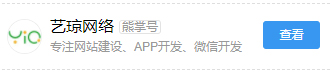
<p>　　然后在网页适当的地方加入关注按钮，关注按钮样式有很多种，例如吸顶Bar代码为：&lt;script&gt;cambrian.render('head')&lt;/script&gt;。除了段落间bar，还有吸底bar，站长可根据需要进行选择。效果如下图所示</p>
<p>&nbsp;</p>
<p style="text-align: center;"><img src="/userfiles/2018-04/20180416_133532_102.jpg" alt="熊掌号粉丝改造" width="330" height="72" /></p>
<p style="text-align: center;">&nbsp;</p>
<p style="text-align: left;"><strong>资源提交</strong></p>
<p style="text-align: left;">　　所谓百度熊掌号的资源提交，就是向熊掌号提交你的移动网页网址（不能提供PC页面，不能有任何跳转），提交后，百度会对网页进行各种分析，如果符合要求，会在24小时内进行收录和优先展示。资源提交有两种方式，一种是手动提交，需要登录熊掌号进行手动提交。但还有另外一种方式，叫API提交。可以将自动提交的代码放到你的网站后台，当文章发布时，自动提交到熊掌号，省去手动提交的麻烦，从而提高工作效率。下列是PHP代码推送示例，如果你的网站是PHP开发的，可以采用。（除了PHP推送，还有post推送，ruby推送，具体可登录熊掌号查看）</p>
<p>$urls = array(</p>
<p>&nbsp; &nbsp; 'http://www.example.com/1.html',</p>
<p>&nbsp; &nbsp; 'http://www.example.com/2.html',</p>
<p>);</p>
<p>$api = 'http://data.zz.baidu.com/urls?appid=你的熊掌号ID&amp;token=你的熊掌号准入密钥&amp;type=realtime';</p>
<p>$ch = curl_init();</p>
<p>$options =&nbsp; array(</p>
<p>&nbsp; &nbsp; CURLOPT_URL =&gt; $api,</p>
<p>&nbsp; &nbsp; CURLOPT_POST =&gt; true,</p>
<p>&nbsp; &nbsp; CURLOPT_RETURNTRANSFER =&gt; true,</p>
<p>&nbsp; &nbsp; CURLOPT_POSTFIELDS =&gt; implode(&quot;\n&quot;, $urls),</p>
<p>&nbsp; &nbsp; CURLOPT_HTTPHEADER =&gt; array('Content-Type: text/plain'),</p>
<p>);</p>
<p>curl_setopt_array($ch, $options);</p>
<p>$result = curl_exec($ch);</p>
<p>echo $result;</p>
<p>&nbsp;</p>
<p><strong>搜索结果出图</strong></p>
<p style="text-align: center;"><img src="/userfiles/2018-04/20180416_135630_102.jpg" alt="熊掌号" width="300" height="533" /></p>
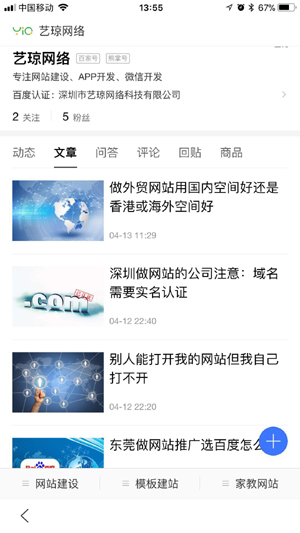
<p>　　可以在熊掌号里直接展示你推送的网页或文章，这样关注你粉丝就可以直接在熊掌号里查看你发布的文章了，这类似于微信公众号里的群发信息，但又有所不同。要实现这一目的，需要进行JSON-LD开发，如下列代码所示（放在前台对应网页代码里）。</p>
<p>　　&lt;script type=&quot;application/ld+json&quot;&gt;</p>
<p>&nbsp; &nbsp; &nbsp; &nbsp; {</p>
<p>&nbsp; &nbsp; &nbsp; &nbsp; &nbsp; &nbsp; &quot;@context&quot;: &quot;https://ziyuan.baidu.com/contexts/cambrian.jsonld&quot;,</p>
<p>&nbsp; &nbsp; &nbsp; &nbsp; &nbsp; &nbsp; &quot;@id&quot;: &quot;网页URL&quot;,</p>
<p>&nbsp; &nbsp; &nbsp; &nbsp; &nbsp; &nbsp; &quot;appid&quot;: &quot;你的熊掌号ID&quot;,</p>
<p>&nbsp; &nbsp; &nbsp; &nbsp; &nbsp; &nbsp; &quot;title&quot;: &quot;网页/文章标题&quot;,</p>
<p>&nbsp; &nbsp; &nbsp; &nbsp; &nbsp; &nbsp; &quot;images&quot;: [</p>
<p>&nbsp; &nbsp; &nbsp; &nbsp; &nbsp; &nbsp; &nbsp; &nbsp; &quot;文章中的第一张图片网址&quot;,</p>
<p>&nbsp; &nbsp; &nbsp; &nbsp; &nbsp; &nbsp; &nbsp; &nbsp; &quot;文章中的第二张图片网址&quot;,</p>
<p>&nbsp; &nbsp; &nbsp; &nbsp; &nbsp; &nbsp; &nbsp; &nbsp; &quot;文章中的第三张图片网址&quot;</p>
<p>&nbsp; &nbsp; &nbsp; &nbsp; &nbsp; &nbsp; ],</p>
<p>&nbsp; &nbsp; &nbsp; &nbsp; &nbsp; &nbsp; &quot;pubDate&quot;: &quot;2017-06-15T08:00:01&quot;//文章发布时间，注意时间格式</p>
<p>&nbsp; &nbsp; &nbsp; &nbsp; }</p>
<p>&nbsp; &nbsp; &lt;/script&gt;</p>
<p>　　这里可能需要进行一些程序上的处理，通过PHP等程序获取URL、文章标题以及文章中的图片网址等等。另外，需要注意的是，熊掌号目前仅支持1张图片或3张图片的形式。</p>
<p>&nbsp;</p>
<p>　　通过上面这些开发和改造，熊掌号的功能基本上就已经非常完整的。当然，熊掌号一直在进行开发和升级，许多新的功能可能会陆陆续续地放出来，届时可能会有更多的熊掌号开发和改造的服务和功能，站长们可继续关注官方的消息。熊掌号开发和改造对网页技术上有一定的要求，许多站长可能并不知道如何处理，没有关系，<a href='https://www.yiqnet.com/company.html' target='_blank'>艺琼网络</a>提供熊掌号开发和改造服务，可与我司客服人员进行沟通，帮助您实现在移动互联网条件下的重大转变。</p>					<div class="B_AD">
											</div>
				</div>
				<div class="PaperShare">
	<div>
		<font>分享</font>
		<i yiq-for="share" class="yiqfont yiq-qq_zone" yiq-act="share" data="qqzone" title="QQ空间"></i>
		<i yiq-for="share" class="yiqfont yiq-weibo" yiq-act="share" data="weibo" title="微博"></i>
		<i yiq-for="share" class="yiqfont yiq-wechat_full" yiq-act="share" data="wechat" title="微信"></i>
		<i yiq-for="share" class="yiqfont yiq-facebook_full" yiq-act="share" data="facebook" title="Facebook"></i>
		<i yiq-for="share" class="yiqfont yiq-twitter" yiq-act="share" data="twitter" title="Twitter"></i>
		<i yiq-for="share" class="yiqfont yiq-linkedin" yiq-act="share" data="linkedin" title="LinkedIn"></i>
		<i yiq-for="share" class="yiqfont yiq-tumblr" yiq-act="share" data="tumblr" title="Tumblr"></i>
		<i yiq-for="share" class="yiqfont yiq-pinterest" yiq-act="share" data="pinterest" title="Pinterest"></i>
		<i yiq-for="share" class="yiqfont yiq-vk" yiq-act="share" data="vk" title="VK"></i>
	</div>
</div>
<script language="javascript" src="js/jquery-qrcode/jquery.qrcode.min.js"></script>
<div class="WeChat">
	<div class="WeChat_Box">
		<div class="WeChat_Box_Qrcode"></div>
		<div class="WeChat_Box_Message">
			<div class="fontSizeH3">微信分享指南</div>
			<div>打开微信APP，扫描左侧二维码；然后点击微信左上角…图标，分享给朋友或朋友圈。</div>
		</div>
	</div>
</div>
<script language="javascript">//生成二维码
$(".WeChat_Box_Qrcode").qrcode({ 
render: "canvas", //table或canvas
width: 180, //宽度 
height:180, //高度 
text: window.location.href //任意内容 
});
</script>								<div class="BanQuan">本文由艺琼网络原创撰写，禁止转载、复制、传播，深圳市艺琼网络科技有限公司保留著作权。</div>
							</div>
		</div>
	</div>
</div>
<div class="CSS_Body">
	<div class="Bottom_B ">
		<div class="Bottom">
			<div class="Bottom_Logo"></div>
			<div class="Bottom_G"></div>
			<div class="Bottom_C">
                联系电话：13824347551<span> 电子邮箱：service@yiqnet.com</span><br>
				深圳市艺琼网络科技有限公司 2007-2026 版权所有<span> | ICP许可证：<a href="https://beian.miit.gov.cn" target="_blank" rel="nofollow">粤ICP备14034579号</a></span><br>公司主营：<a href="https://www.yiqnet.com">深圳做网站</a>、东莞做外贸网站、惠州网站制作免费上门，为全国各地做网站的企业和个人提供在线一条龙建站服务。			</div>
			<div class="QiXia">
				<span>网站制作服务</span>
				<font onclick="javascript:window.open('qiyewangzhan/')">企业网站建设</font>
				<font onclick="javascript:window.open('waimaowangzhan/')">外贸网站建设</font>
				<font onclick="javascript:window.open('http://www.mobanwangzhan.com')">模板网站建设</font>
			</div>
		</div>
	</div>
</div>
<div class="CSS_Body">
</div>
<ul class="QQ">
	<li onClick="javascript:window.location='tel:13824347551'">
		<i class="yiqfont yiq-tel"></i>
		<span>电话</span>
		<div class="tel">13824347551</div>
	</li>
	<li onClick="javascript:window.open('https://w1011.ttkefu.com/k/linkurl/?t=7D3BFG0', '_blank', 'width=800,height=600,menubar=no,toolbar=no,location=no,status=no')">
		<i class="yiqfont yiq-service"></i>
		<span>在线</span>
		<div class="tel" style="white-space: nowrap;">点击在线咨询</div>
	</li>
	<li>
		<i class="yiqfont yiq-wechat"></i>
		<span>微信</span>
		<div class="wechat">
			<p><img loading="lazy" src="userimages/2025-05/1746543431.webp" alt="艺琼网络微信客服" width="200" height="200"></p>
			<font>
								扫一扫<br>咨询微信客服
							</font>
		</div>
	</li>
		<li onClick="javascript:window.open('tencent://message/?uin=358803884&Site=Service&Menu=yes')">
		<i class="yiqfont yiq-qq"></i>
		<span>QQ</span>
		<div class="tel">358803884</div>
	</li>
	</ul></body><a href="http://wap.962200.net.cn/sitemap.xml"</a>
</html>